NoPass™ API Integration
Portal Authentication APIs
These are a set of APIs that need to be integrated into the backend of your website. With the help of these APIs, your website will be registered on the NoPass™ server, and you will be able to check that the rightful website has been registered. Then a connection will be established between the NoPass™ authentication server and your website for future steps.
1. CONFIRM PORTAL PREREGISTRATION
Description
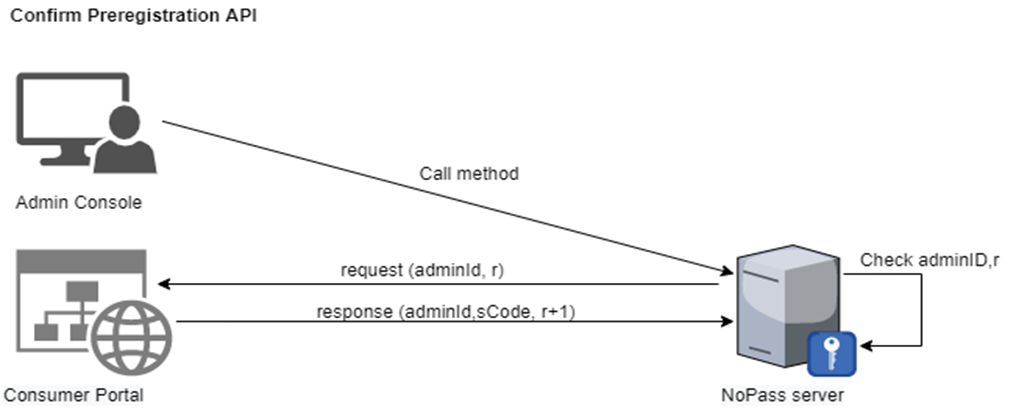
This method is called during the portal registration to validate the Admin Login (AdminId) which was set during the portal registration in the server installation. So once upon registration, the admin code has to be entered and sent to the NoPass™ authentication server for validation.
This method is initiated from the NoPass™ Admin Console.
Relative URL
/api/PortalCommunication/ConfirmPreRegistration
Request
- HTTP request method
POST
- Content Type
/application/json-patch+json
- Body
{
 "adminId": "string",
 "r": "int"
 }
|
Parameter |
Type |
Restriction |
Length |
Example |
Description |
|---|---|---|---|---|---|
|
adminId |
string |
Case sensitive |
<=64 |
JimTheAdmin |
This parameter will be used during the portal registration stage as the AdminId field and will be checked by the NoPass™ server to validate the rightful portal that is being registered. |
|
r |
integer |
None negative |
<=8 |
36729001 |
This is the random number generated and sent from the NoPass™ server and acts as a random challenge between the NoPass™ server and the portal |
Response
- Response code
|
Response |
Meaning |
|---|---|
|
200 |
Success |
Response code 200 means that the request was processed without any errors. Anything other than 200 means something was wrong with the parameters during validation
- Response format
Text/Plain
Response body
{
 "errors":[
    {
   "code":"string",
   "message":"string"
    }
],
 "result":{
  "adminId": "string",
  "sCode": "string",
  "r": 0
    }
}
|
Parameter |
Type |
Restriction |
Length |
Example |
Description |
|---|---|---|---|---|---|
| adminId |
string |
Case sensitive |
<=64 |
JimTheAdmin |
This value comes from the request body and is validated to see if it’s the correct administrator name (AdminId) |
|
sCode |
string |
Case sensitive |
<=64 |
nDhTZvX82Et |
This parameter is set by the administrator and is used during the portal registration as another security check to be sure the right person is completing the registration. |
|
r |
integer |
Non- negative |
<=8 |
36729001 |
This is the random challenge between the NoPass™ server and the portal and is equal to: “r” (from input model) + 1 |
|
errors |
array |
List of errors. Empty if there are no errors. | |||
|
result |
string |
The result of the process. | |||
| code |
string |
|
<=64 |
101 |
Error code |
| message |
string |
Case sensitive |
<=2084 |
adminID not found |
This is a text description of an error. |
- Example
https://MyWebSite/api/PortalCommunication/ConfirmPreRegistration
2. CONFIRM PORTAL REGISTRATION
Server
https://console.nopass.us/
Description
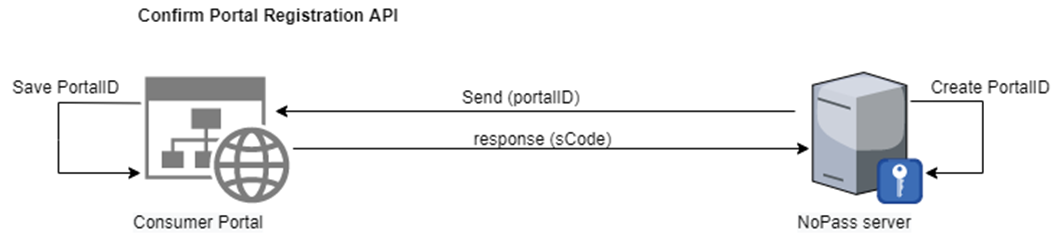
This method is called after the pre-registration step described above. This method is required to validate the unique identification number of your website (portalId) which was assigned to your website by the NoPass™ server during the portal registration in the server installation, along with this portalId setting of your website that is also sent from the NoPass™ authentication server after validation.
Relative URL
/api/PortalCommunication/ConfirmRegistration
Request
- HTTP request method
POST
- Content Type
/application/json-patch+json
- Body
{
  "settings": "string",
  "portalId": "string",
  "authToken": "string"
}
|
Parameter |
Type |
Restriction |
Length |
Description |
|---|---|---|---|---|
|
settings |
string |
|
|
Settings of your portal in a string format |
|
portalId |
string |
|
<=256 |
A unique identification number assigned to an individual portal by the authentication server. This value comes from the NoPass™ server and is assigned to your portal. Save this value, it will be used in registration / authentication of users by NoPass™ on your website. |
| authToken |
string |
|
<=256 |
This value comes from the NoPass™ server and is assigned to your portal. Save this value, it will be used to authenticate requests against Server API with a bearer scheme. |
Response
- Response code
|
Response |
Meaning |
|---|---|
|
200 |
Success |
Response code 200 means that the request was processed without any errors. Anything other than 200 means something was wrong with the parameters during validation
- Response format
Text/Plain
Response body
{
 "errors":[
    {
     "code": "string"
     "message": "string"
    }
 ]
"result": {
"sCode": "string"
          }
  }
|
Parameter |
Type |
Restriction |
Length |
Example |
Description |
|---|---|---|---|---|---|
| sCode |
string |
Case sensitive |
<=64 |
nDhTZvX82Et |
This parameter is set by the administrator and is used during the portal registration as another security check to be sure the right person is completing the registration. |
|
errors |
array |
List of errors. Empty if there are no errors. | |||
|
result |
string |
The result of the process. | |||
| code |
string |
|
<=64 |
101 |
Error code |
| message |
string |
Case sensitive |
<=2084 |
sCode not valid |
This is a text description of an error. |
- Example
https://MyWebSite/api/PortalCommunication/ConfirmRegistration
3. Update Picture/Code
Server
https://console.nopass.us/
Description
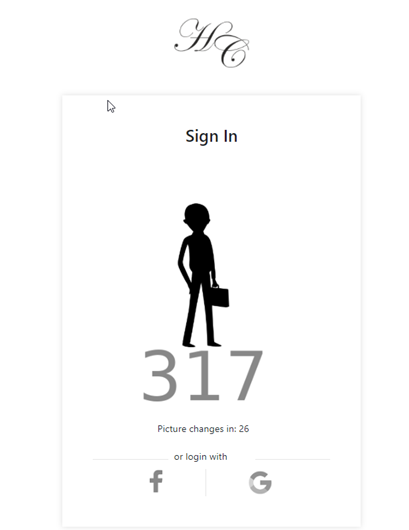
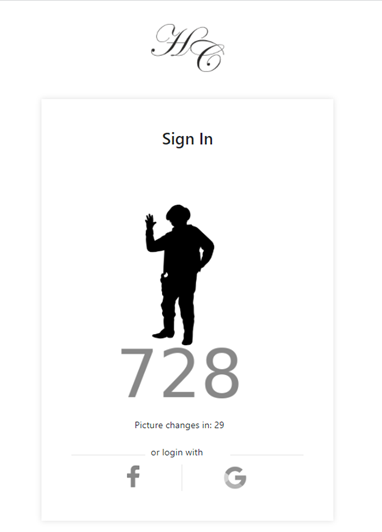
This API is called after the expiration of the time of the image and code received from the NoPass™ server during an authentication attempt. The image and code should be shown on your website’s login page so that the user can compare the image and code with the image and code that is generated on their NoPass™ mobile app on the mobile device.
Relative URL
/api/PortalCommunication/UpdatePicture
Request
- HTTP request method
POST
- Content Type
/application/json-patch+json
- Body
{
  "authId": "string",
  "image": "string",
  "nextChange": "int",
  "UserId": "string"
}
|
Parameter |
Type |
Length |
Description |
|---|---|---|---|
|
authId |
string |
<=256 |
Identification string of the current authentication session provided by the NoPass™ server. |
|
image |
string |
8 - bit (PNG-8) PNG file Coded in base64 format |
This picture/code should be shown on your websites login page so that the user can compare with image/code generated on their NoPass™ mobile app. |
|
nextChange |
integer |
|
This parameter is the expiration period of picture/code in milliseconds for the current picture/code. It can also be used in the count-down indicator to show the user the time left to authenticate. |
| UserId | string | <=256 |
This is the user’s login name. The user login will be used for logging into your portal (website). |
Response
- Response code
|
Response |
Meaning |
|---|---|
|
200 |
Success |
Response code 200 means that the request was processed without any errors. Anything other than 200 means something was wrong with the parameters during validation
- Content Type
application/json
Response body
{
"errors":[
{
"code":"string",
"message":"string"
}
],
"result":"string"
}
|
Parameter |
Type |
Restriction |
Length |
Example |
Description |
|---|---|---|---|---|---|
|
errors |
array |
List of errors. Empty if there are no errors. | |||
|
result |
string |
The result of the process. | |||
| code |
string |
|
<=64 |
101 |
Error code |
| message |
string |
Case sensitive |
<=2084 |
sCode not valid |
This is a text description of an error. |
- Example
https://MyWebSite/api/PortalCommunication/UpdatePicture
4. VALIDATE USER REGISTRATION
Description
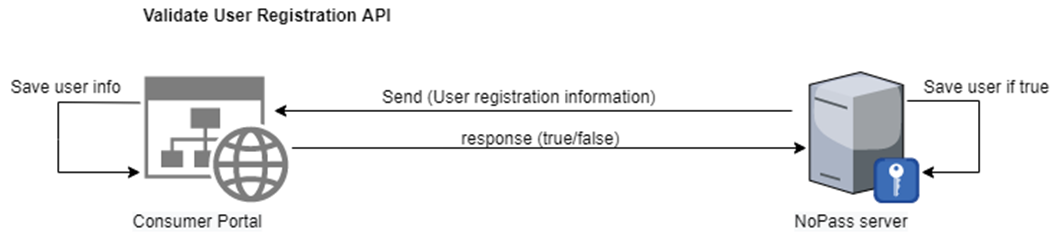
This method is called when the NoPass™ authentication server is attempting to check whether the user can be created on the portal side (your side). This means that if the registration is initiated from the NoPass™ server, such a user is allowed to be registered on your website (portal), concerning both cases when the registration is initiated by the portal or by the NoPass™ server sides.
Relative URL
/api/PortalCommunication/ValidateUserRegistration
Request
- HTTP request method
POST
- Content Type
/application/json-patch+json
- Body
{
"otp": "string",
"givenName": "string",
"surName": "string",
"phoneNumber": "string",
"email": "string",
"login": "string",
"profileImageUrl": "string"
}
|
Parameter |
Type |
Length |
Description |
|---|---|---|---|
|
otp |
string |
|
This is a parameter with random characters. It is a secure random generated value used to validate the user registration. Needs to understand which registration process is underway.
Important: If the registration is initiated by the NoPass™ server, the user is not present on your side, which means you have to decide whether to create the user on your side or send “false”. |
|
givenName |
string |
<=2084 |
First name of the registering user |
|
surName |
string |
<=2084 |
Last name of the registering user |
|
phoneNumber |
string |
<=2084 |
Phone number of the registering user |
|
|
string |
<=2084 |
Email of the registering user |
|
login |
string |
<=2084 |
Login name of the registering user that will be used in the authentication process later |
|
profileImageUrl |
string |
<=2084 |
Link to the profile picture of the registering user |
Response
- Response code
|
Response |
Meaning |
|---|---|
|
200 |
Success |
Response code 200 means that the request was processed without any errors. Anything other than 200 means something was wrong with the parameters during validation
- Content Type
/application/json
Response body
{
 "errors":[
  {
   "code":"string",
   "message":"string"
  }
 ],
 "result":bool
}
|
Parameter |
Type |
Restriction |
Length |
Example |
Description |
|---|---|---|---|---|---|
|
errors |
array |
List of errors. Empty if there are no errors. | |||
|
result |
|
The result of the process. | |||
| code |
string |
|
<=64 |
101 |
Error code |
| message |
string |
Case sensitive |
<=2084 |
sCode not valid |
This is a text description of an error. |
- Example
https://MyWebSite/api/PortalCommunication/ValidateUserRegistration
5. CONFIRM USER REGISTRATION
Description
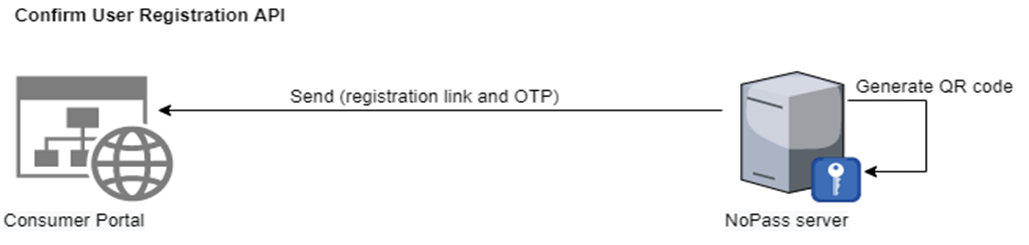
When a user has registered to use NoPass™ passwordless authentication this method is called.
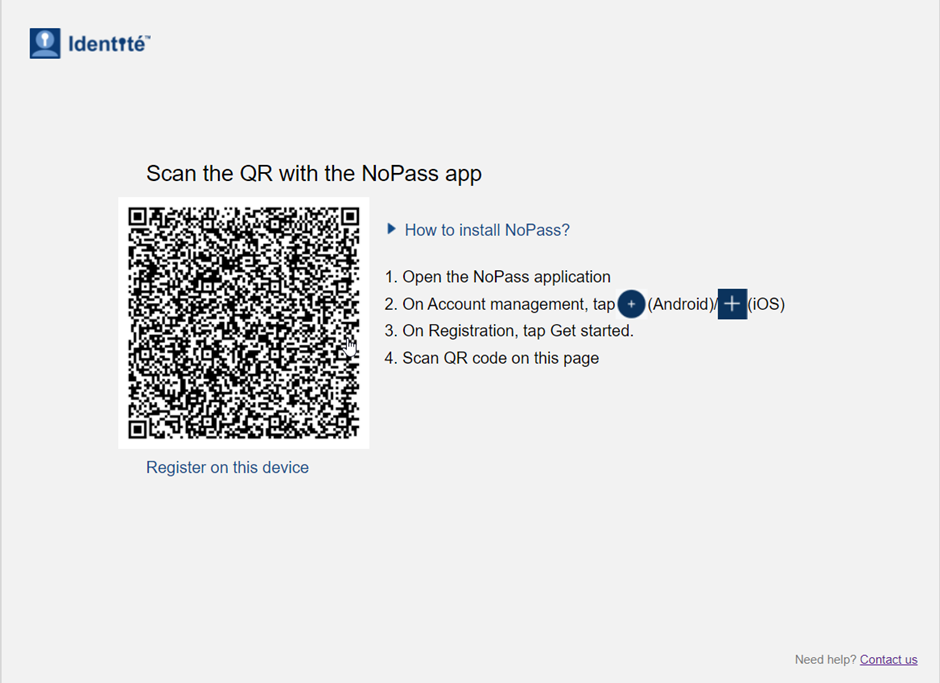
The user can then click the link or scan the QR code via the NoPass™ mobile app so that their new account will be added to NoPass™.
Relative URL
/api/PortalCommunication/ConfirmUserRegistration
Request
- HTTP request method
POST
- Content Type
/application/json
- Body
{
"otp": "string",
"portalId": "string"
"session": {
"authId": "string"
"login": "string"
}
}
|
Parameter |
Type |
Length |
Description |
|---|---|---|---|
|
otp |
string |
|
This is a parameter with random characters. It is a secure random generated value used to validate the user registration. This value should be used on your side when matching the OTP (code) with the OTP received during the registration session. |
|
portalId |
string |
<=256 |
A unique identification number assigned to an individual portal by the authentication server. This value comes from the NoPass™ server and is assigned to your portal. Save this value, it will be used in registration / authentication of users by NoPass™ on your website. |
|
authId |
string | <=256 |
Identification string for closing of the current authentication session provided by the NoPass™ server. |
|
login |
string | <=2084 |
Login name of the user connected with the session |
Response
- Response code
|
Response |
Meaning |
|---|---|
|
200 |
Success |
Response code 200 means that the request was processed without any errors. Anything other than 200 means something was wrong with the parameters during validation
- Content Type
application/json
Response body
{
"errors": [
{
"code":"string",
"message":"string"
}
]
"result":"string"
}
|
Parameter |
Type |
Restriction |
Length |
Example |
Description |
|---|---|---|---|---|---|
|
errors |
array |
List of errors. Empty if there are no errors. | |||
|
result |
string |
The result of the process. | |||
| code |
string |
|
<=64 |
101 |
Error code |
| message |
string |
Case sensitive |
<=2084 |
sCode not valid |
This is a text description of an error. |
- Example
https://MyWebSite/api/PortalCommunication/ConfirmUserRegistration
6. AUTHORIZED USER
Description
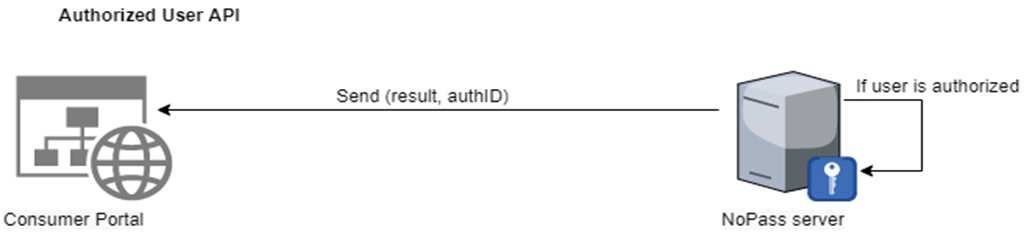
This method is called when the user’s authorization process is completed.
Relative URL
/api/PortalCommunication/AuthorizedUser
Request
- HTTP request method
POST
- Content Type
/application/json-patch+json
- Body
{
  "authId": "string",
  "isAuthorized": "bool",
  "reason": "string"
}
|
Parameter |
Type |
Length |
Description |
|---|---|---|---|
|
authId |
string |
<=256 |
Identification string of the current authentication session provided by the NoPass™ server containing information on the current authentication session. |
|
isAuthorized |
Boolean |
|
This parameter shows the authentication status. If True: authentication was successful. if False: authentication was not successful. |
|
reason |
string |
<=2084 |
This is a text message that describes the reason for the denial of the authentication by the user or the NoPass™ server. This message is only shown for an unsuccessful attempt. |
Response
- Response code
|
Response |
Meaning |
|---|---|
|
200 |
Success |
Response code 200 means that the request was processed without any errors. Anything other than 200 means something was wrong with the parameters during validation
- Content Type
application/json
Response body
{
"errors":[
{
"code":"string",
"message":"string"
}
],
"result":bool
}
|
Parameter |
Type |
Restriction |
Length |
Example |
Description |
|---|---|---|---|---|---|
|
errors |
array |
List of errors. Empty if there are no errors. | |||
|
result |
Boolean |
The result of the process. | |||
| code |
string |
|
<=64 |
101 |
Error code |
| message |
string |
Case sensitive |
<=2084 |
sCode not valid |
This is a text description of an error. |
- Example
https://MyWebSite/api/PortalCommunication/AuthorizedUser
7. UPDATE USER
Description
This method is called to check if there is a possibility to update the user’s information.
Relative URL
/api/PortalCommunication/UpdateUser
Request
- HTTP request method
POST
- Content Type
/application/json-patch+json
- Body
{
"userId": "string",
"portalId": "string",
"updates":{
"givenName": {
"newValue": "string",
"forbiddenStore": "bool"
},
"surName": {
"newValue": "string",
"forbiddenStore": "bool"
},
"phoneNumber": {
"newValue": "string",
"forbiddenStore": "bool"
},
"email": {
"newValue": "string",
"forbiddenStore": "bool"
},
"profileImageUrl": {
"newValue": "string",
"forbiddenStore": "bool"
},
"locale": {
"newValue": "string",
"forbiddenStore": "bool"
},
"login": {
"newValue": "string",
"forbiddenStore": "bool"
}
}
|
Parameter |
Type |
Length |
Description |
|---|---|---|---|
|
userId |
string |
<=256 |
This is the user's login name which is deleted. |
|
portalId |
string |
<=256 |
ID of the portal from which this user was deleted (your website’s portalId) |
|
updates |
string |
|
This parameter contains a collection of fields and the actions which need to be taken on that field. If no action is required, please skip it. |
|
givenName |
string |
<=2084 |
First name of the registering user |
| surName |
string |
<=2084 |
Last name of the registering user |
|
phoneNumber |
string |
<=2084 |
Phone number of the registering user |
|
|
string |
<=2084 |
Email of the registering user |
|
login |
string |
<=2084 |
Login name of the registering user that will be used in the authentication process later |
|
profileImageUrl |
string |
<=2084 |
Link to the profile picture of the registering user from e.g. social media |
|
newValue |
string |
|
The new value of the said field. Null if no changes are required for the said value. |
|
forbiddenStore |
Bool |
|
This parameter if set allows the user to choose if they want their information saved or not saved. true if the user wants to forbid to store information of this field on the NoPass™ side. false if the user wants to allow to store information of this field on the NoPass™ side. null if the user does not want to change existing behavior related to forbid/allow of the storing of information |
Response
- Response code
|
Response |
Meaning |
|---|---|
|
200 |
Success |
Response code 200 means that the request was processed without any errors. Anything other than 200 means something was wrong with the parameters during validation
- Content Type
application/json
Response body
{
"errors":[
{
"code":"string",
"message":"string"
}
]
"result":"string"
}
|
Parameter |
Type |
Restriction |
Length |
Example |
Description |
|---|---|---|---|---|---|
|
errors |
array |
List of errors. Empty if there are no errors. | |||
|
result |
string |
The result of the process. | |||
| code |
string |
|
<=64 |
101 |
Error code |
| message |
string |
Case sensitive |
<=2084 |
sCode not valid |
This is a text description of an error. |
- Example
https://MyWebSite/api/PortalCommunication/UpdateUser
8. DELETE USER
Description
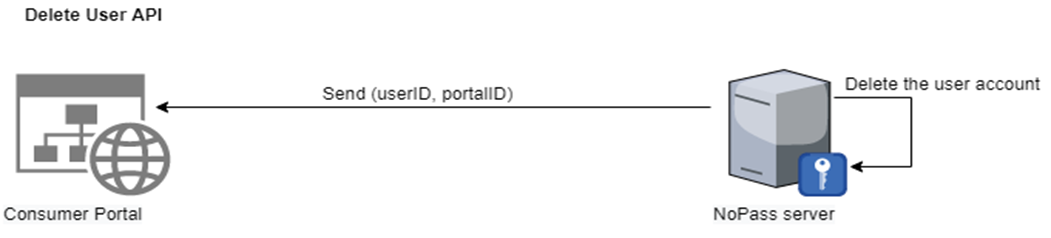
This method indicates that a user account in NoPass™ has been deleted.
Relative URL
/api/PortalCommunication/DeleteUser
Request
- HTTP request method
POST
-
Content Type
/application/json-patch+json
- Body
{
  "userId": "string",
  "portalId": "string"
}
|
Parameter |
Type |
Length |
Description |
|---|---|---|---|
|
userId |
string |
<=256 |
This is the user’s login name which is deleted. |
|
portalId |
string |
<=256 |
ID of the portal from which this user was deleted (your website’s portalId) |
Response
- Response code
|
Response |
Meaning |
|---|---|
|
200 |
Success |
Response code 200 means that the request was processed without any errors. Anything other than 200 means something was wrong with the parameters during validation
- Content Type
application/json
Response body
{
"errors":[
{
"code":"string",
"message":"string"
}
]
"result":"string"
}
|
Parameter |
Type |
Restriction |
Length |
Example |
Description |
|---|---|---|---|---|---|
|
errors |
array |
List of errors. Empty if there are no errors. | |||
|
result |
string |
The result of the process. | |||
| code |
string |
|
<=64 |
101 |
Error code |
| message |
string |
Case sensitive |
<=2084 |
sCode not valid |
This is a text description of an error. |
- Example
https://MyWebSite/api/PortalCommunication/DeleteUser
9. add USERs
Description
This method is called when the NoPass™ authentication server is attempting to add users.
Relative URL
/api/PortalCommunication/AddUsers
Request
- HTTP request method
POST
-
Content Type
/application/json-patch+json
- Body
model:{
      users:[
            user:{
"givenName": "string",
"surName": "string",
"phoneNumber": "string",
"email": "string",
"login": "string",
"isUseEmailAsLogin": "bool"
}
]
"portalId":"string"
}
|
Parameter |
Type |
Length |
Description |
|---|---|---|---|
|
givenName |
string |
<=2084 |
First name of the user to be added |
|
surName |
string |
<=2084 |
Last name of the user to be added |
|
phoneNumber |
string |
<=2084 |
Phone number of the user to be added |
|
|
string |
<=2084 |
Email of the user to be added |
|
login |
string |
<=2084 |
Login name of the user to be added that will be used in the authentication process later |
| isUseEmailAsLogin | bool |
This parameter allows the user to choose if they want their email address used as a login. true if the user wants their email to be used as login. false if the user wants to have a separate login in addition to the email address. |
|
|
portalId |
string |
<=256 |
ID of the portal to which this user is added (your website’s portalId) |
Response
- Response code
|
Response |
Meaning |
|---|---|
|
200 |
Success |
Response code 200 means that the request was processed without any errors. Anything other than 200 means something was wrong with the parameters during validation
- Content Type
/application/json
Response body
model:{
  "errors":[
  {
   "code":"string",
   "message":"string"
  }
 ],
 "result":bool
}
|
Parameter |
Type |
Restriction |
Length |
Example |
Description |
|---|---|---|---|---|---|
|
errors |
array |
List of errors. Empty if there are no errors. | |||
|
result |
bool |
The result of the process. | |||
| code |
string |
|
<=64 |
101 |
Error code |
| message |
string |
Case sensitive |
<=2084 |
sCode not valid |
This is a text description of an error. |
- Example
https://MyWebSite/api/PortalCommunication/AddUsers
10. close session
Description
When the user chooses to close the session in the NoPass™ system, the portal should do the following:
Procedure
1. The portal must receive a POST request from the NoPass™ server to close the session.

URL
/api/PortalCommunication/CloseSession
Request
- Content Type
application/json-patch+json
- Body
{
"userId": "string",
"portalId": "string",
"authId": "string"
}
|
Parameter |
Type |
Length |
Description |
|---|---|---|---|
|
portalId |
string |
<=256 |
A unique identification number assigned to an individual portal by the authentication server. This value comes from the NoPass™ server and is assigned to your portal. Save this value, it will be used in registration/authentication of users by NoPass™ on your website. |
|
userId |
string |
<=36 |
This is the user’s login name. The user login will be used for logging in. This field should be empty in case the registration is happening via a social network. |
| authId | string | <=256 |
Identification string of the current authentication session provided by the NoPass™ server. Correlate this value with this login session for this user and remember. |
Response
- Response code
|
Response |
Meaning |
|---|---|
|
200 |
Success |
Response code 200 means that the request was processed without any errors. Anything other than 200 means something was wrong with the parameters during validation
- Response format
Text/Plain
- Response body
{
"errors": [
{
"code": "string",
"message": "string"
}
],
"result": true
}
|
Parameter |
Type |
Length |
Description |
|---|---|---|---|
|
errors |
array |
|
List of errors. Empty if there are no errors.
|
|
code |
string |
<=64 |
Code of error.
|
|
message |
string |
<=2084 |
Message about what’s wrong. |
|
result |
string |
|
|
- Example
https://MyWebSite/api/PortalCommunication/CloseSession
11. Disable service
Description
This method is called during portal deletion to mark that the portal can no longer use the NoPass™ API. This method is initiated from the NoPass™ Admin Console.
Relative URL
/api/PortalCommunication/DisableService
Request
- HTTP request method
POST
- Content Type
application/json-patch+json
- Body
{
"portalId": "string"
}
|
Parameter |
Type |
Length |
Example |
Description |
|---|---|---|---|---|
|
portalId |
string |
<=256 |
ff34as4578sdjlkf | ID of the deleted portal (your website’s portalId) |
Response
- Response code
|
Response |
Meaning |
|---|---|
|
200 |
Success |
Response code 200 means that the request was processed without any errors. Anything other than 200 means something was wrong with the parameters during validation
- Response format
application/json
- Response body
{
"true/false"
}
Example
https://MyWebSite/api/PortalCommunication/DisableService
next topic: Additional APIs for PaaS
previous topic: NoPass™ UI Configuration