GETTING STARTED
Introduction
To enable incoming users to your service to authenticate without a password via NoPass™, you will first need to integrate the NoPass™ APIs to your web portal (website). These APIs are in charge of different aspects of the communication between the NoPass™ server and your portal, such as registering your portal on the NoPass™ server, registering and authenticating users once they come into your website, and many others. This document provides the necessary information for the implementation of these APIs and examples of commonly used user action scenarios. It also describes samples of the UI changes that are needed on your portal.
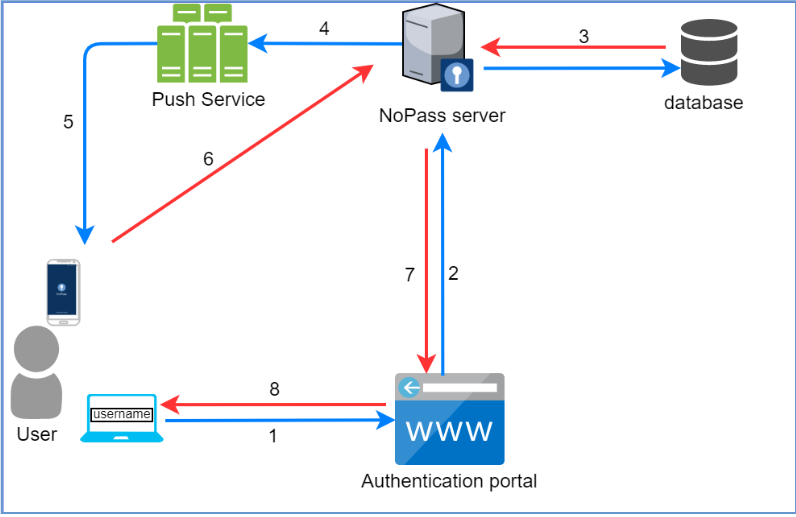
1. A user initiates authentication in the portal with the NoPass™ application.
2. The authentication portal sends an authentication request to the NoPass™ application server.
3. The NoPass™ server checks the user in the database.
4. The server generates and sends a push request to the Push service.
5. The push service receives the push request and sends a push notification to the user's device.
6. The NoPass™ mobile application in the user's device sends the authentication response to the NoPass™ application server.
7. The NoPass™ application server sends the authentication response to the authentication portal.
8. The access to the services of the authentication portal is either provided or not.
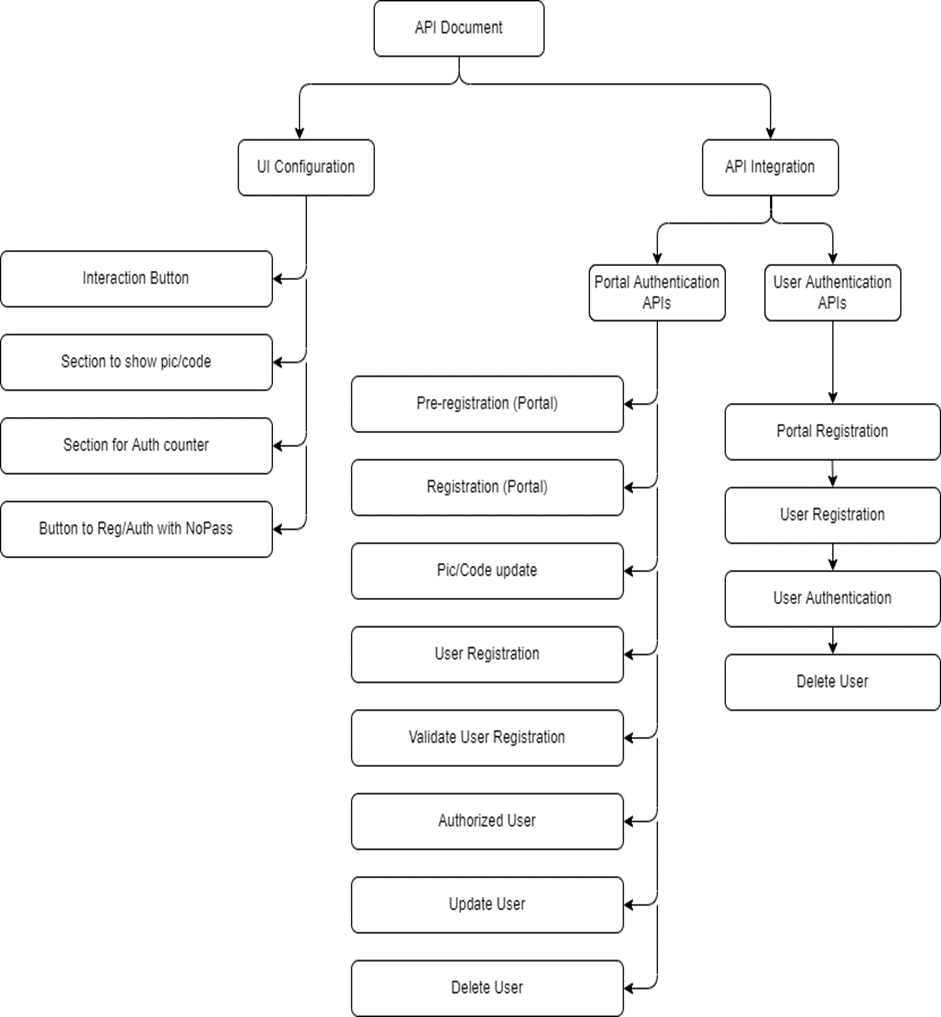
As seen in the diagram below, the NoPass™ integration consists of two main parts:
- UI Configuration
- API Integration
In this section, we will purely discuss the APIs that you will need to integrate so that the NoPass™ server can communicate with your website.
Before you begin
Before you begin integrating the NoPass™ APIs, there are a few aspects that need to be addressed so that the developers can interact with NoPass™ server endpoints to perform registration, authentication, and user management.
Scheme: PortalUrl/api
PortalUrl is the fully qualified URL of the portal that is using NoPass™ to authenticate its users.
PortalUrl is a string type with length <=2048,
For example, https://<MyWebSite>/ or https://<WebPortals>/Portal1/
The api route that should be realized is api
The Portal URL is different from the NoPass™ server URL, for example:
- Portal URL: https://identite.us/
- NoPass Server URL: https://nopass.identite.us/
Your selection of NoPass™ product schemas determines which URLs from your Domain zone you will need to allocate.
INTEGRATION SPECIFIC OPTIONS
- NoPass™ Consumer "Web Portal" (for example, Login.<your_domain>.com). This will be the user login portal for your instance of NoPass™.
next topic: NoPass™ UI Configuration
previous topic: Overview: NoPass™ SaaS Consumer "Web Portal"